
사고쳤어요
[node / ts] Puppeteer로 웹페이지 크롤링하기 (하스스톤 카드 정보) 본문
Puppeteer | Puppeteer
build
pptr.dev
Puppeteer는 Chrome 또는 Firefox를 제어할 수 있는 고급 API를 제공하는 JavaScript 라이브러리이다.
웹페이지를 크롤링을하는 라이브러리는 다양하게 존재하지만, JavaScript 또는 TypeScript를 통해 크롤링을 하기 위해서 위 라이브러리를 사용하게 되었다.
npm i puppeteer # Downloads compatible Chrome during installation.
npm i puppeteer-core # Alternatively, install as a library, without downloading Chrome.
위 명령어를 통해 라이브러리를 설치한 뒤 진행하면 된다.
크롤링
크롤링은 카드 게임 "하스스톤"의 카드 정보들을 크롤링 할 것이다.
https://hearthstone.blizzard.com/ko-kr/cards?set=legacy&viewMode=table
하스스톤 카드 라이브러리
최신 카드를 살펴보고 새로운 덱을 구상해보세요!
hearthstone.blizzard.com
크롤링할 카드 라이브러리 웹사이트이다.
"고전"이라는 검색 조건으로 "테이블 보기"를 통해 카드에 대한 정보들이 테이블로 나열되어있는 것을 볼 수 있다.

코드
import puppeteer from "puppeteer";

const BASE_URL =
  "https://hearthstone.blizzard.com/ko-kr/cards?set=legacy&viewMode=table";
먼저 puppeteer를 import해준 뒤 URL을 입력해준다.
(async () => {
  const browser = await puppeteer.launch();
  const page = await browser.newPage();

  console.log("페이지 열기...");
  await page.goto(BASE_URL, { waitUntil: "networkidle0" });
puppeteer.launch()를 통해 브라우저를 실행,
browser.newPage()를 통해 페이지를 실행한다.
page.goto(BASE_URL)을 통해 우리가 크롤링하고 싶은 웹페이지로 이동할 수 있으며 옵션들을 적용할 수 있다.
위 코드에서는 waitUntili: "networkidle0"이라는 옵션을 적용하였는데,
이는 500ms동안 네트워크 요청이 0개일 때 페이지 이동을 완료한다는 뜻이다.
이외에도 window.onlad 발생 시 완료되는 load, DOMContentLoaded 발생 시 완료되는 domcontentloaded 등의 옵션이 있다.
await page.waitForSelector(
  "table.CardTableLayout__CardTableView-sc-1si3xqh-1"
);

await page.screenshot({ path: "debug.png", fullPage: true });
page.waitForSelector()를 통해 원하는 요소가 로드될 때까지 대기한다.
물론 위에서 waitUntil 옵션을 통해 로드가 될 때까지 대기를 하고 있지만, 안정성을 위해 위 코드를 추가해주었다.
만약 waitUntil 옵션도 적용하지 않고, waitForSelector도 적용하지 않고 바로 크롤링을 진행하게 된다면
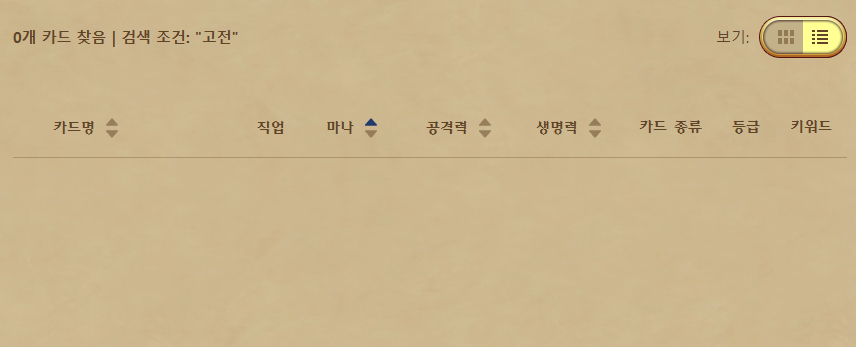
위와 같이 아무것도 로드되지 않은 페이지를 크롤링하여 아무 결과도 나오지 않을 수 있다.
추가로 page.screenshot()을 통해 현재 puppeteer에서 이동한 웹페이지 스크린샷을 저장할 수 있다.
이를 통해 원하는 요소가 다 로드되었는지 디버깅할 수 있다.
console.log("카드 정보 수집 중...");

const cards = await page.evaluate(() => {
const rows = document.querySelectorAll(
  "table.CardTableLayout__CardTableView-sc-1si3xqh-1 > tbody > tr"
);

const results: any[] = [];

rows.forEach((row) => {
  const name = row.querySelector(".name")?.textContent?.trim() || "";
  results.push({ name });
});

return results;
});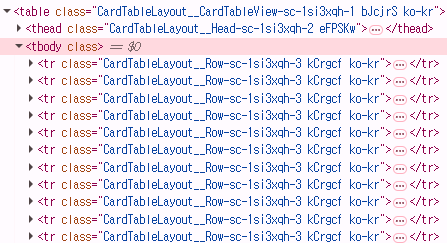
본격적으로 카드 정보를 수집할 차례이다. (쉬운 이해를 이해 이름만을 크롤링하였다.)
하스스톤 카드 라이브러리 페이지는 위와 같이 <table> <tbody> 아래에 <tr>, <tr> ... 형식으로 카드들이 나열되어 있다.
document.querySelectorAll(
"table.CardTableLayout__CardTableView-sc-1si3xqh-1 > tbody > tr"
);
를 통해서 모든 카드들에 대한 정보를 저장해준 후 results를 리턴해준다.
전체 코드
import puppeteer from "puppeteer";

const BASE_URL =
  "https://hearthstone.blizzard.com/ko-kr/cards?set=legacy&viewMode=table";

(async () => {
  const browser = await puppeteer.launch();
  const page = await browser.newPage();

  console.log("페이지 열기...");
  await page.goto(BASE_URL, { waitUntil: "networkidle0" });

  // 카드 요소 로드까지 대기
  await page.waitForSelector(
    "table.CardTableLayout__CardTableView-sc-1si3xqh-1"
  );

  await page.screenshot({ path: "debug.png", fullPage: true });

  console.log("카드 정보 수집 중...");

  const cards = await page.evaluate(() => {
    const rows = document.querySelectorAll(
      "table.CardTableLayout__CardTableView-sc-1si3xqh-1 > tbody > tr"
    );

    const results: any[] = [];

    rows.forEach((row) => {
      const name = row.querySelector(".name")?.textContent?.trim() || "";
      results.push({ name });
    });

    return results;
  });

  console.log(cards);

  await browser.close();
})();
위와 같이 카드 이름들이 잘 크롤링되는 것을 확인할 수 있다.
이제 이름뿐만 아니라 카드의 모든 정보들을 크롤링해보자.
전체 코드
import puppeteer from "puppeteer";
import fs from "fs-extra";
import path from "path";
import { HearthstoneCard } from "@/cards";

const OUTPUT_JSON = path.join(__dirname, "../cards.json");

const BASE_URL =
  "https://hearthstone.blizzard.com/ko-kr/cards?set=legacy&viewMode=table";

(async () => {
  const browser = await puppeteer.launch();
  const page = await browser.newPage();

  await page.setViewport({
    width: 1920,
    height: 1080,
  });

  console.log("페이지 열기...");
  await page.goto(BASE_URL, { waitUntil: "domcontentloaded", timeout: 60000 });

  await page.waitForSelector(
    "table.CardTableLayout__CardTableView-sc-1si3xqh-1"
  );

  await page.screenshot({ path: "debug.png", fullPage: true });

  console.log("카드 정보 수집 중...");

  const cards = await page.evaluate(() => {
    const rows = document.querySelectorAll(
      "table.CardTableLayout__CardTableView-sc-1si3xqh-1 > tbody > tr"
    );

    const results: HearthstoneCard[] = [];

    rows.forEach((row) => {
      // 카드 이름
      const name = row.querySelector(".card .name")?.textContent?.trim() || "";

      // 마나
      const manaStr = row
        .querySelector(".iconNumeric .manaCost")
        ?.textContent?.trim();
      const mana = manaStr ? parseInt(manaStr) : null;

      // 직업
      let cardClass = "";
      const classIconDiv = row.querySelector(".ClassIconContainer .ClassIcon"); // 가장 안쪽의 ClassIcon div를 선택
      if (classIconDiv) {
        const classList = Array.from(classIconDiv.classList); // 클래스 목록을 배열로 변환
        const classKeyword = classList.find(
          (cls) =>
            ![
              "CircleIcon-fmr8yz-0",
              "ClassIcon-sc-1hgwqgj-0",
              "ClassControl__ItemIcon-jisfzz-1",
              "DtAzA",
              "ClassIcon",
            ].includes(cls)
        );
        if (classKeyword) {
          cardClass = classKeyword;
        }
      }

      // 공격력
      const attackElement = row.querySelector(".iconNumeric .attack");
      const attackStr = attackElement
        ? attackElement.textContent?.trim()
        : null;
      const attack =
        attackStr && attackStr !== "-" ? parseInt(attackStr) : null;

      // 생명력
      const healthElement = row.querySelector(".iconNumeric .health");
      const healthStr = healthElement
        ? healthElement.textContent?.trim()
        : null;
      const health =
        healthStr && healthStr !== "-" ? parseInt(healthStr) : null;

      // 종류, 종족, 속성
      let type = ""; // 종류 (하수인, 주문, 무기, 영웅, 장소)
      let minionType: string[] = []; // 종족 (야수, 용족, 악마...)
      let spellSchool: string[] = []; // 주문 속성 (암흑, 화염, 냉기...)

      const typeElement = row.querySelector(
        "h6.CardTableLayout__TitleText-sc-1si3xqh-5.loMGUg"
      );
      if (typeElement) {
        const typeText = typeElement.textContent?.trim() || "";
        const parts = typeText.split(" - ").map((p) => p.trim());

        // 종류(하수인, 주문, 무기, 영웅, 장소)
        type = parts[0];

        // 하수인인 경우, 종족
        if (type === "하수인" && parts.length > 1) {
          minionType = parts[1].split(",").map((r) => r.trim());
        }
        // 주문인 경우, 속성
        else if (type === "주문" && parts.length > 1) {
          spellSchool = parts[1].split(",").map((s) => s.trim());
        }
      }

      // 등급
      let rarity = "";
      const rarityElement = row.querySelector(
        "h6.CardTableLayout__RarityText-sc-1si3xqh-6"
      );

      if (rarityElement) {
        const rarityText = rarityElement.textContent?.trim() || "";
        if (rarityText === "무료") {
          rarity = "일반"; // "무료" => "일반"
        } else {
          rarity = rarityText;
        }
      }

      // 키워드
      const keywords: string[] = [];
      const keywordElements = row.querySelectorAll(
        "h6.CardTableLayout__KeywordText-sc-1si3xqh-7"
      );

      keywordElements.forEach((element) => {
        const keywordText = element.textContent?.trim();
        if (keywordText) {
          keywords.push(keywordText);
        }
      });

      results.push({
        packs: "고전",
        name,
        mana,
        class: cardClass,
        attack,
        health,
        type,
        rarity,
        keywords: keywords,
        minionType,
        spellSchool,
        imagePath: "",
      });
    });

    return results;
  });

  // JSON 저장
  await fs.writeJson(OUTPUT_JSON, cards, { spaces: 2 });

  await browser.close();
})();
[
  {
    "packs": "고전",
    "name": "룬벼리기",
    "mana": 1,
    "class": "deathknight",
    "attack": null,
    "health": null,
    "type": "주문",
    "rarity": "희귀",
    "keywords": [
      "시체"
    ],
    "minionType": [],
    "spellSchool": [
      "암흑"
    ],
    "imagePath": ""
  },
  {
    "packs": "고전",
    "name": "맹독 송장",
    "mana": 1,
    "class": "deathknight",
    "attack": 1,
    "health": 2,
    "type": "하수인",
    "rarity": "희귀",
    "keywords": [
      "전투의 함성"
    ],
    "minionType": [
      "언데드"
    ],
    "spellSchool": [],
    "imagePath": ""
  },
  ...
]
imagePath는 테이블 보기에서 제공되지 않아 추가적인 작업이 필요하지만, 나머지 모든 정보들 크롤링에 성공하였다.
'JavaScript' 카테고리의 다른 글
| JavaScript 객체 (0) | 2025.04.01 |
|---|---|
| JavaScript 제어 흐름(Flow Control) (0) | 2025.03.27 |
| JavaScript 연산자 (0) | 2025.03.27 |
| JavaScript 타입 (0) | 2025.03.26 |
| JavaScript 변수 (0) | 2025.03.26 |