
사고쳤어요
[Node.js] MySQL 연결하여 사용하기 본문
https://www.npmjs.com/package/mysql2
mysql2
fast mysql driver. Implements core protocol, prepared statements, ssl and compression in native JS. Latest version: 3.12.0, last published: 2 months ago. Start using mysql2 in your project by running `npm i mysql2`. There are 5217 other projects in the npm
www.npmjs.com
npm을 통해 mysql2 모듈을 설치하여 디비 환경을 연동하여 보자.
먼저 위의 페이지에 나와있는대로 npm install --save mysql2 명령어를 통해 설치를 진행한다.
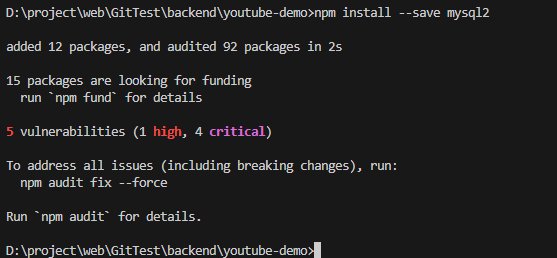
설치가 완료되었으면, 문서에서 소개하는 방법을 참고하여 SQL 쿼리문을 작성해보자.
const mysql = require("mysql2");

const connection = mysql.createConnection({
  host: "localhost",
  user: "root",
  database: "youtube",
  password: "", // 비밀번호 입력
});

const sql = "SELECT * FROM `users`";

connection.query(sql, (err, rows, fields) => {
  if (err instanceof Error) {
    console.log(err);
    return;
  }
  console.log(rows);
  console.log(fields);
});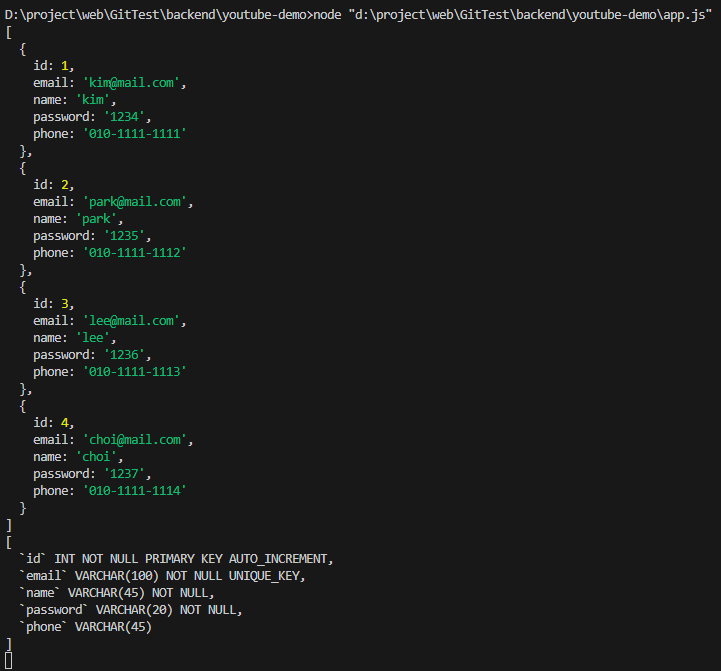
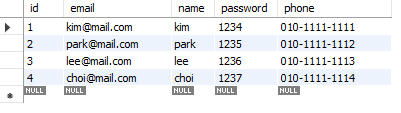
디비에 저장했던 내용들이 성공적으로 불러와졌다!
이제 불러온 데이터들을 사용할 수 있도록 가공하여 보자.
rows를 살펴보면 [ ] (array) 안에 { } (json) 형태로 row가 하나씩 들어있는 것을 확인할 수 있다.
console.log(rows[0]); console.log(rows[0].name); 을 실행하면?
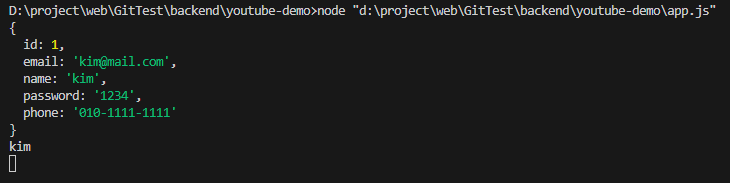
다음과 같이 첫 번째 값과 그 이름만이 나오는 것을 볼 수 있다.
'웹 풀스택' 카테고리의 다른 글
| [Node.js] .env를 통해 환경 변수 설정하기 (0) | 2025.02.26 |
|---|---|
| Error Code 1298 incorrect time zone: 'Asia/Seoul' 해결, Node.js에서 MySQL연결 시 Time 값이 다르게 불러오는 문제 해결 (0) | 2025.02.26 |
| [MySQL] 유튜브 서비스 - 명령어 없이 스키마, 테이블 만들기 (0) | 2025.02.26 |
| MySQL Workbench에서 DB 테이블 만져보기 (0) | 2025.02.25 |
| 데이터베이스, DBMS, SQL (0) | 2025.02.24 |
'웹 풀스택' Related Articles
more


